
A Security and Privacy Comparison of Popular Messaging Apps
Let's keep this between us

There’s quite a variety of messaging apps that are popular for communication among your friends, family, and business partners. I wanted to take a look of some of the most popular and see how they stack up based on:
Is end-to-end encryption (E2EE) enabled by default?
Is the app open source or proprietary/closed source, and who owns it?
Whether the app has a good reputation for privacy and security, and key concerns in these areas.
The providers’ visibility into your data and cloud data retention practices.
For this article I’m limiting the scope to applications primarily used on smartphones, not enterprise messaging like Microsoft Teams or Slack. Here’s what we’ll look at:
SMS / MMS / RCS texting
Because this article is looking at how these messaging apps compare in the realms of security and privacy, we should first define those terms.
“Security” primarily focuses on data itself, maintaining its confidentiality, integrity, and protecting against unauthorized access. This is achieved through safeguards ike encryption, firewalls, authentication, and access controls.
“Privacy” concerns control over how personal information is collected, used, stored, and shared. The focus is on the individual’s rights regarding their personal information. Privacy is protected through policies, laws like the EU’s GDPR, consent forms, and regulations.
Security and privacy are interconnected but distinct: Security provides the technical backbone to enable privacy. Privacy extends beyond security to include societal and legal dimensions. In practice, strong security enhances privacy (e.g., encrypted communications protect personal conversations), but neglecting privacy can undermine security efforts (e.g., over-collecting data creates larger attack surfaces).
Note: If you’re reading this article on your phone the tables will be easier to view if you rotate it to landscape mode.
First, privacy, security, licensing, and ownership:
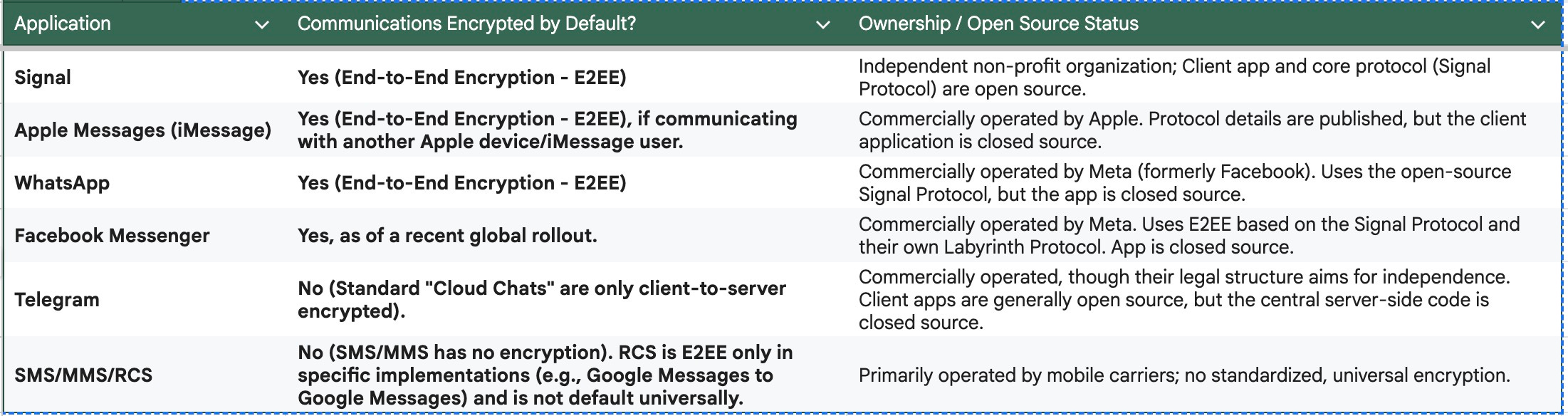
Of these, Signal, Messages (with caveats), WhatsApp, and Facebook Messenger have E2EE. However, E2EE on Messages only works with other Messages clients, not when you’re texting someone not on the platform.
Telegram chats are not E2EE. And of course regular texting via SMS, MMS, or RCS is not encrypted. Google Messages to Google Messages are E2EE.
Note that the only fully open source app in this list is Signal. Everything else is proprietary or a mix of open and closed source.
This matters because it means that open source applications can be reviewed by third parties, while closed source cannot be.
Now let’s take a look at these apps’ general reputations in the industry:
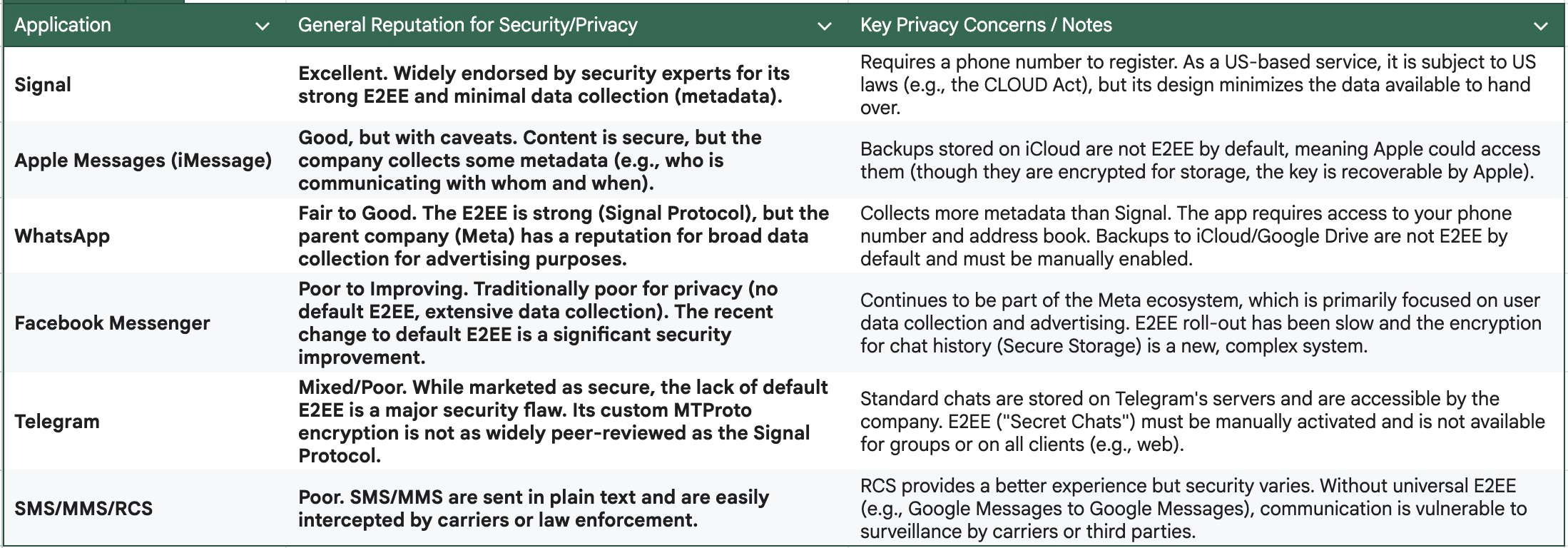
As expected, Signal has the best general reputation for privacy and security. While it requires a phone number to register, you can share a different Signal ID with others that you want to message with but not share your phone number.
Apple Messages is generally very secure and private in use but not as much as Signal.
WhatsApp and Facebook Messenger are both owned by Meta. Based on Meta’s track record with regards to collecting, using, and sharing personal data I don’t trust it as far as I can throw it.
Telegram and texting bring up the bottom of the pack. Neither were really designed with security or privacy in mind (especially SMS / MMS / RCS). In my opinion, Telegram is best used by subscribing to channels of interest, leaving messaging to other, more private and secure systems.
We should also look at whether messages can be set to self-destruct (Mission Impossible, anyone?), message retention times, and group size limits.
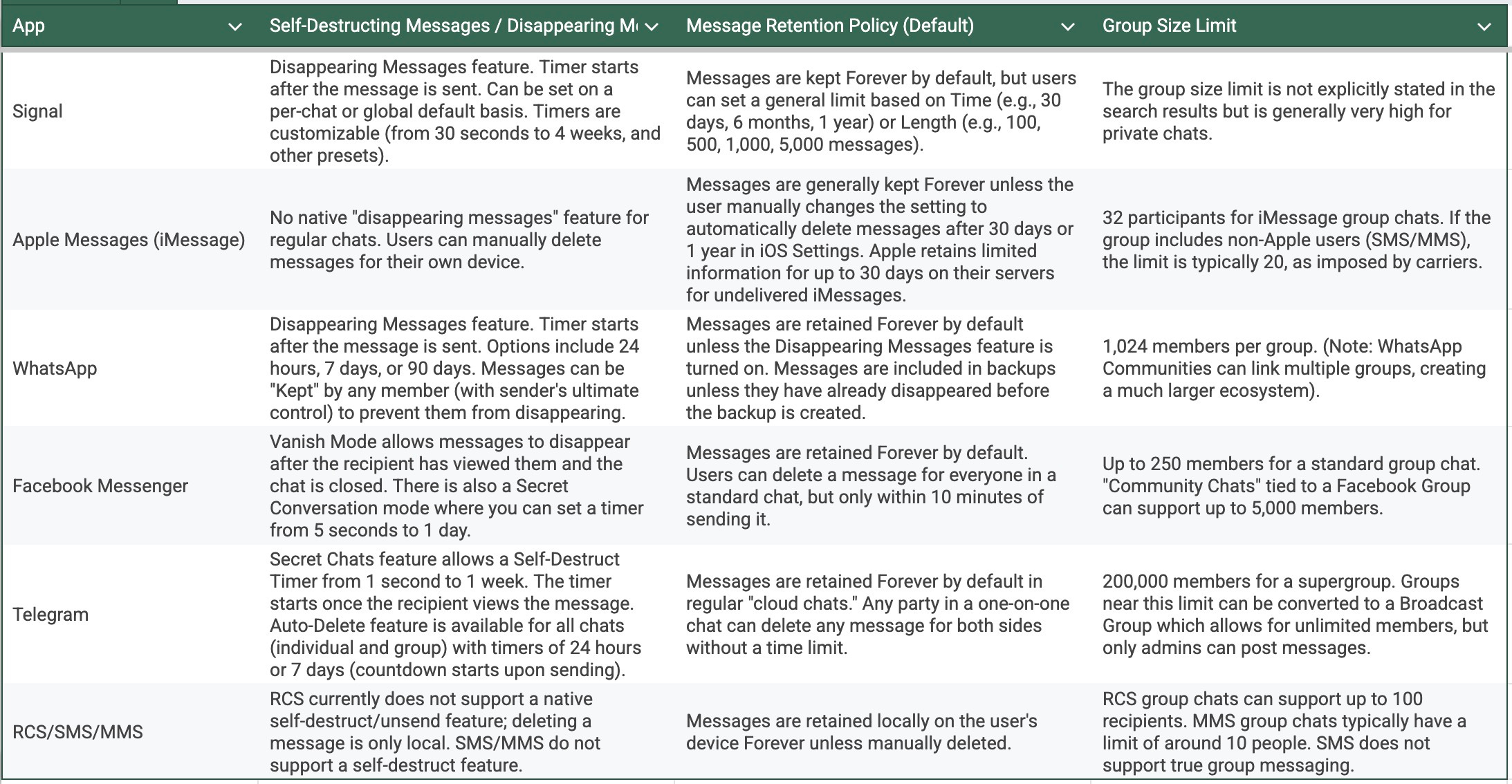
Once again, Signal has the most granular controls on message retention. Messages lacks self-destructing messages and the group size limit is small compared to the others, especially Telegram.
Aside from message retention on your device we want to look at what visibility the different platforms give to their providers and how much data and of what type are stored in the cloud. “The cloud” of course, is someone else’s computer.
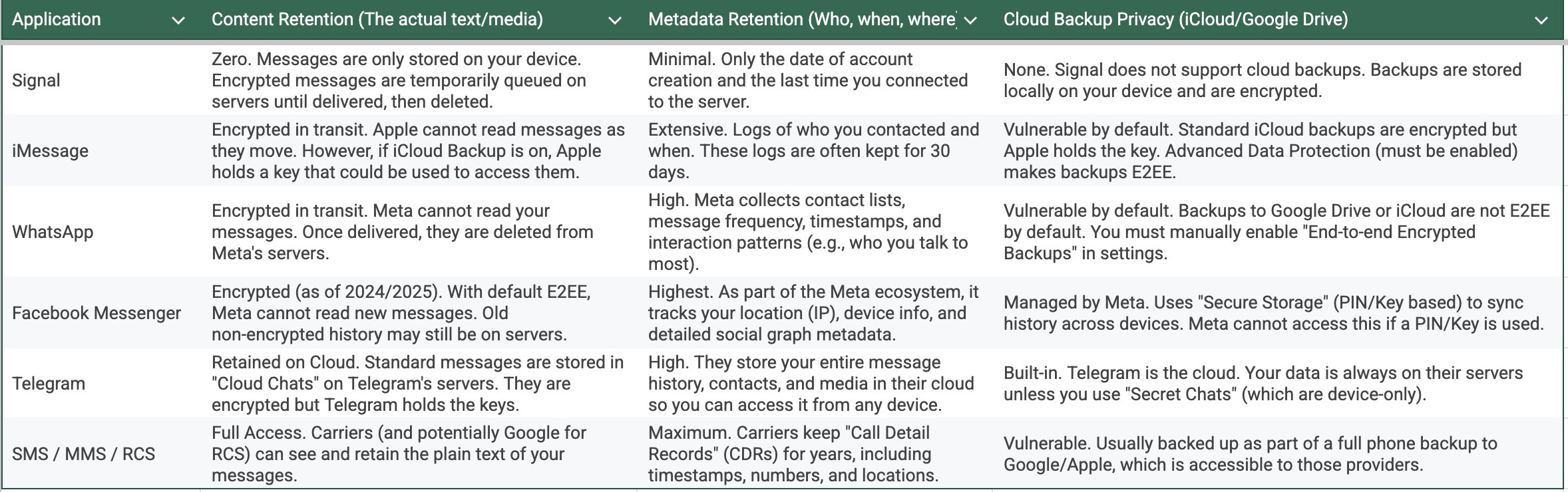
There are some key privacy-related implications from this.
The “Metadata” Trap: Even if a company cannot read your message (like WhatsApp), knowing who you talk to, how often, and from where is often enough to build a detailed profile of your life. Signal is the only app in this list that actively tries to hide this metadata.
The Backup Loophole: Many users don’t realize that while their messages are “secure” while being sent, they become “insecure” once they are backed up to Apple or Google’s cloud. If you use WhatsApp or iMessage, you must manually enable encrypted backups to close this loophole.
Telegram’s Business Model: Telegram is a “Cloud Messenger.” This means they prioritize convenience (having your messages on every device instantly) over privacy (storing the keys themselves).
Apple offers Advanced Data Protection for iCloud. You should strongly consider enabling it. Click here for how to do so.
Google’s Advanced Protection was introduced in Android 16. The EFF has an article describing its features and how to enable it. Click here for that.
Finally, I wanted to look at cross-platform compatibility. Not everyone you need to communicate with with be on the same mobile or desktop platform as you. So, the ability of messaging programs to run on not just Apple or Android, but also different desktop OSes is something you probably want to consider if you’re picking one for group use.
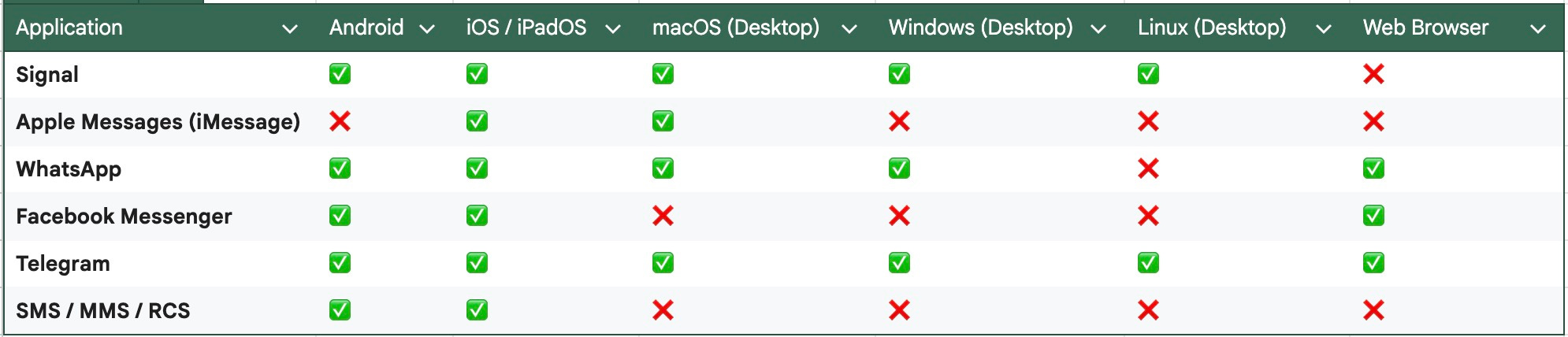
Signal is by far the most cross-platform compatible. Apple Messages is great if you’re in the Apple ecosystem. The others have varying degrees of cross-platform apps. Note that Facebook Messenger used to have desktop apps for Windows and Mac, but they are now deprecated. You can sign directly into FM using a web browser, without having a window or tab open to Facebook, however.
Of these the two I use most often are Messages and Signal, with different groups of people and for different use cases. I’ve used Telegram to a lesser degree, but once I understood that it lacks default E2EE for messaging I’ve limited my use to subscribing to feeds, much like a newsreader.
From a user interface perspective being able to run a desktop client is extremely handy for me. I’m generally using my MacBook Air during working hours. Being able to use a real keyboard and view messages on a large screen give me ergonomics far superior to a cell phone’s or tablet’s.
This article would be incomplete if we don’t consider a weakness common to all messaging apps: Its users. I’m reminded of the XKCD cartoon “Security” from several years ago:
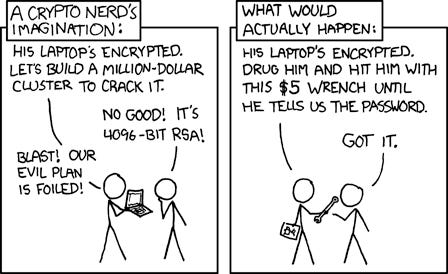
Courtesy of my friend Gary Scharf, another way to look at this is:
[W]hen it comes to group opsec, … you’re only as secure as your weakest members willingness to endure someone beating their kid or dog with a pipe.
No matter how secure the app itself is, the information you discuss in it can be compromised with poor security practices like weak passwords, inadvertent disclosure, or having it beaten out of you.
Hopefully this article will help you in making a more informed decision as to your messaging platform of choice.
~~~~
Valuable feedback on a draft of this article were provided by my friend Gary Scharf and Nicholas Balog. Thanks, guys!
~~~~
If you’d like to view the spreadsheet these tables are from you can see it here in my G Drive:
https://docs.google.com/spreadsheets/d/1bwzO2gxa606cuADqf9hHkyTJalwlgmDmTrFaasQBZWc/edit?usp=sharing